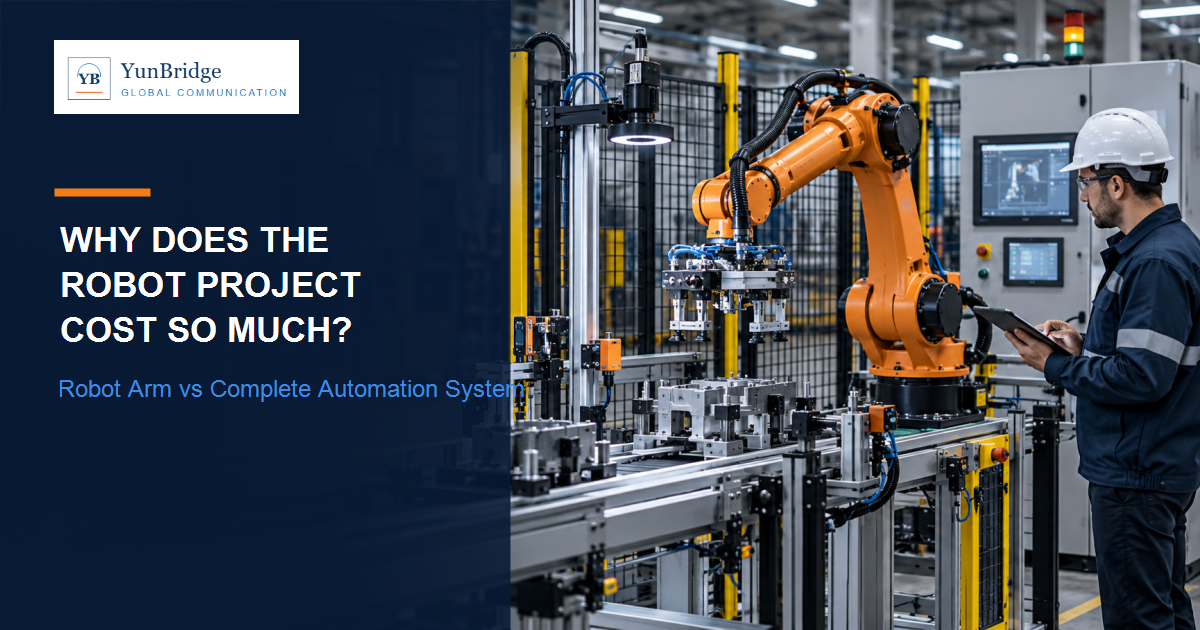
The Robot Is Only One Part of the Automation System
A basic robot quotation may cover the arm, controller and teach pendant or standard accessories. A production-ready system must also receive product, locate it, grip it, move it safely, communicate with surrounding equipment and recover when something is missing or abnormal.
A useful mental model is: Product or material → sensor or vision → PLC and control logic → robot → EOAT → fixture, conveyor or machine → safety system → upstream and downstream equipment. If one interface is unstable, the robot can work perfectly while the cell still fails to deliver production output.
OSHA’s robot-safety material describes a completed robot application as more than an arm: end-effectors, sensors, safeguarding, control equipment and fixtures all form part of the application. The exact scope depends on the process, but the principle is consistent: the buyer is purchasing a working application, not just a moving mechanism.
OSHA technical material on robot applications and safeguards ->
Where Does the Money Go in an Industrial Automation Project?
There is no reliable universal percentage for each cost category. The mix changes with product variation, production rate, machine interfaces, safety requirements, customization, destination site and the scope each supplier accepts. The categories below explain the work that a buyer may be paying for.
1. Application Engineering
Before equipment can be built, the project team may need to define product characteristics, process sequence, cycle time, payload, orientation, tolerances, layout, interfaces, upstream conditions, downstream conditions and failure or recovery logic. This work may be invisible in the finished machine, but it determines whether the selected robot, tooling and controls fit the real task.
2. End-of-Arm Tooling
EOAT can include vacuum cups, vacuum generators, mechanical or pneumatic grippers, servo grippers, multi-pick tooling, sensors, brackets, quick-change systems and custom fingers. In many projects the robot is a standard product while the EOAT is custom-engineered for the product’s surface, weight, flexibility, variation and required orientation. A small change in product size can affect grip points, vacuum performance, collision clearance and robot path.
3. Fixtures, Conveyors and Product Presentation
Locating fixtures, indexing or continuous conveyors, feeders, trays, escapements, buffers, orientation devices and reject handling all affect the robot’s job. A fast robot cannot compensate for unstable product presentation. If parts arrive inconsistently, the system may need more sensing, vision, buffering or recovery logic before a supplier can promise stable output.
4. Vision Systems and Sensors
A vision scope may include cameras, lenses, lighting, software, calibration, part recognition, orientation detection, barcode or inspection logic and conveyor tracking. Sensors may detect presence, position, pressure, vacuum, door state or downstream availability. Purchasing a camera does not create a working vision system; the lighting, calibration, coordinate transform, timing and exception behavior need engineering and testing under real product conditions.
5. PLC, HMI and Electrical Controls
The cell may need a PLC, HMI, I/O, safety PLC or safety I/O, drives, industrial networks, an electrical cabinet, breakers, contactors, relays, terminals, power supplies, wiring, cables and connectors. Siemens describes integrated automation around control, motion, safety and visualization; the exact brand is a project choice, but the controls must coordinate the whole cell rather than only start the robot.
Siemens Totally Integrated Automation overview ->
6. Machine Safety and Safeguarding
Safety scope can include a risk assessment, guarding, interlocked gates, light curtains, area scanners, emergency stops, safety PLC or I/O, safe-motion functions and validation. Safety is designed for the complete application, including tooling, product, fixtures, access and surrounding machines. One solution does not fit every cell, and this article does not provide legal certification advice.
OSHA robotics standards and guidance ->
7. Software, Programming and Machine Interfaces
The software scope may include the robot program, PLC logic, HMI screens, recipes, error handling, machine handshakes, vision interfaces, network communication and data exchange with MES where applicable. Making a robot move is often easier than making the entire production line recover correctly when a product is missing, a vision result fails, a conveyor stops, a downstream machine is full, the gripper loses a product or an operator restarts the cell after a fault.
8. Mechanical Fabrication and Electrical Assembly
Even when the main components are standard, the cell may require a robot base, frames, guards, brackets, conveyor structure, machining, cabinet construction, wiring, pneumatic piping, assembly and labeling. These are the physical pieces that make the robot fit the customer’s layout and make maintenance and safe access practical.
9. Integration, Debugging and Cycle-Time Optimization
A robot, EOAT, vision system, PLC, conveyor, fixtures, sensors, safety circuits and line interfaces must work together continuously. Integration finds timing conflicts, coordinate errors, edge cases, alarm behavior, recovery sequences and product variation that are not visible when each component is tested alone. The final debugging stage can require substantial engineering effort because normal and abnormal conditions both need to be handled.
10. FAT, Installation, Commissioning and Training
A project may include factory acceptance testing, punch-list correction, packing, shipping preparation, site installation, leveling, electrical connection, integration with customer equipment, site acceptance or commissioning where applicable, production ramp-up, operator training, maintenance training and documentation. FAT and site commissioning are different activities; agree what each one proves before purchase.
Industrial Robot vs Complete Automation System: What Are You Actually Paying For?
| Component | What It Does | Why It Adds Cost or Engineering |
|---|---|---|
| Robot | Provides programmed motion | Model selection, payload, reach, controller and configuration |
| EOAT | Grips, holds or processes the product | Often custom to product surface, variation and orientation |
| Fixtures | Locates and supports product or tooling | Requires tolerances, changeover and maintenance access |
| Conveyor or material handling | Presents, transfers, buffers or rejects product | Must synchronize flow, spacing and recovery |
| Vision and sensors | Detects position, presence, identity or condition | Needs lighting, calibration, timing and exception logic |
| PLC and HMI | Coordinates sequence, recipes and operator actions | Requires controls design, screens and machine handshakes |
| Electrical system | Distributes power and connects devices | Includes cabinet, protection, wiring, network and labeling |
| Safety | Controls access and hazardous motion | Requires application-specific assessment, hardware and validation |
| Software | Runs robot, PLC, vision and interfaces | Includes programming, alarms, backups and change management |
| Integration | Makes subsystems work as one cell | Requires debugging, timing work and abnormal-condition testing |
| Testing and site work | Proves and starts the system | FAT, punch list, installation, commissioning and training |
Why Can an Automation Project Take So Long?
The longest lead-time item is not necessarily the robot. Some stages can overlap, while others depend on requirements, layout, tooling and interfaces being frozen. A practical sequence is:
- Requirement definition: product, rate, tolerances, environment and acceptance conditions.
- Concept and layout: architecture, cell footprint, access, material flow and interfaces.
- Mechanical design: fixtures, EOAT, frames, conveyors, guarding and service access.
- Electrical and control design: cabinet, I/O, network, safety and HMI structure.
- Component procurement: robot, controls, sensors, cameras, drives and long-lead parts.
- Fabrication, assembly and wiring: the custom cell is built and documented.
- Robot, PLC and vision programming: normal sequence, recipes, alarms and interfaces.
- Integration and debugging: timing, calibration, product variation and recovery logic.
- Cycle-time optimization: stable production behavior under agreed conditions.
- FAT and punch-list correction: evidence, open items and corrections before shipment.
- Shipping, site installation and commissioning: connect the cell to the customer’s environment.
- Production ramp-up and training: transfer operation, maintenance and documentation.
Project duration depends heavily on application complexity, custom engineering, component availability, integration requirements and site conditions. A supplier that gives a date without stating assumptions may be quoting only equipment availability rather than a complete production-ready handover.
What Usually Slows Down an Industrial Automation Project?
- Application requirements are not finalized, or product samples change after design begins.
- Product tolerances, surface behavior or presentation conditions are not understood early.
- Late design changes affect EOAT, fixtures, vision, conveyor layout, robot paths or guarding.
- Long-lead components or third-party machines arrive later than the integration plan assumes.
- Upstream and downstream handshakes, data signals or responsibility boundaries are unclear.
- Vision is unstable under real lighting, product variation or conveyor timing.
- The safety concept changes after the mechanical or electrical design is already advanced.
- FAT conditions and pass criteria were not agreed early enough to guide testing.
- The customer site, utilities, floor, network, access or receiving equipment is not ready.
- Several suppliers communicate through different people and unresolved questions are not recorded.
Why Late Changes Are Expensive
A late requirement can propagate across several subsystems. Changing a product size may affect the EOAT grip points, fixture geometry, vision field of view, conveyor spacing, robot path, cycle time, guarding and software recipes. A request that sounds small to a buyer can therefore require mechanical redesign, new parts, new calibration and another integration test.
The practical protection is to freeze the requirements that drive interfaces, record assumptions and price change requests against the affected scope. This does not prevent reasonable improvements; it makes their effect visible before the project team commits to a new design.
What Is Robotic Process Automation — and Is It the Same as Industrial Automation?
If you search for “what is robotic process automation,” the usual meaning is software-based automation. Robotic Process Automation (RPA) uses software bots to perform repetitive digital or business tasks such as entering data, transferring information between applications, filling forms or executing rule-based back-office workflows.
IBM overview of Robotic Process Automation (RPA) ->
Industrial automation concerns physical production systems: industrial robots, PLCs, sensors, conveyors, machines, tooling and safety systems. RPA automates digital workflows; industrial robot automation automates physical production tasks. They share the word “robotic” under the broader automation umbrella, but they are different technology categories. This article focuses on physical industrial automation projects, not software RPA implementations.
Why a Robot Quote and a Turnkey Automation Quote Can Look So Different
A robot quotation may cover mainly the robot, controller and standard accessories. A turnkey system quote may make one supplier responsible for engineering, tooling, controls, safety, integration, testing and site work. The buyer can therefore compare a component price with complete project responsibility without realizing that the scopes are different.
Before comparing prices, normalize the scope of supply.
Ask each supplier to identify inclusions, exclusions, assumptions, provisional items and interface responsibilities. A lower quote may be reasonable because it excludes installation or customer-supplied conveyors; the problem is when the buyer does not understand that exclusion and later discovers an unplanned project obligation.
What Should Buyers Check in an Automation Quotation?
- Robot, controller and robot base or pedestal where applicable
- EOAT, tooling changeover and product-contact parts
- Vision, lighting, calibration and conveyor tracking where applicable
- Conveyor, feeder, fixture, buffer and reject handling where applicable
- Sensors, PLC, HMI, I/O, drives and industrial network
- Electrical cabinet, protection, wiring, pneumatic components and labeling
- Safety hardware, guarding, interlocks, scanners and validation responsibilities
- Robot programming, PLC logic, HMI screens, recipes, alarms and backups
- Upstream and downstream interfaces and who provides each signal or machine
- FAT conditions, test product, cycle criteria, punch-list process and retest
- Installation, commissioning, training, documentation, travel and shipping
- Spare parts, support channels, software access and maintenance responsibilities
Not every project needs every item. The important point is that the quote should say whether each relevant item is included, excluded, customer-supplied or still to be defined.
Red Flags in a “Cheap” Automation Quote
- Cycle rate is quoted without product, payload, path, vision or test conditions.
- EOAT is excluded or described only as “standard tooling” without a design basis.
- Vision, calibration, conveyor tracking or exception handling is unclear.
- Safety responsibility and guarding assumptions are not defined.
- PLC, HMI, electrical cabinet or upstream and downstream interfaces are unspecified.
- FAT criteria, test product and correction process are missing.
- Installation and commissioning are excluded without explaining who will perform them.
- Software backups, documentation, access rights and spare parts are undefined.
- No party accepts responsibility for complete line performance.
An exclusion does not automatically prove that a supplier is unreliable. It may be a legitimate customer-supplied scope. The buyer’s risk increases when the exclusion is hidden, misunderstood or left without an owner.
Who Is Responsible for the Complete System Performance?
Ask directly: who owns the final integration responsibility?
Possible parties include the robot manufacturer, a system integrator, a machine builder, a vision supplier, a conveyor supplier, the customer or a third-party engineering company. Robot manufacturer and system integrator are different roles. One company may perform both, but that should be confirmed rather than assumed.
The buyer should identify who owns application engineering, mechanical and electrical integration, software handshakes, FAT, site commissioning, performance evidence and after-sales escalation. Clear responsibility is more useful than a broad statement that a supplier provides a “complete solution.”
A Simple Buyer Rule: Compare Scope, Not Just Robot Price
- Define the production requirement: product, rate, tolerances, presentation, environment and recovery needs.
- Define the complete scope: robot, EOAT, material handling, vision, controls, safety, software, testing and site work where applicable.
- Identify who is responsible for every mechanical, electrical, software and line interface.
- Compare supplier quotations on an equivalent scope with assumptions shown clearly.
- Agree FAT product, conditions, measurements, pass criteria and punch-list handling before purchase.
- Clarify installation, commissioning, training, documentation, backups, spare parts and support.
- Evaluate lifecycle support and maintainability alongside the initial purchase price.
For the architecture decision before requesting quotations, see Delta vs SCARA vs 6-Axis vs Cobot: Which Robot Should You Choose?. It explains how application motion, payload, reach, orientation and safety affect robot selection.
For a practical way to compare supplier proposals after requirements are defined, see How to Compare Automation Quotations from Chinese Suppliers. It organizes scope, performance, controls, FAT, commissioning and support before price.
Does a Higher Automation Project Price Automatically Mean a Better System?
No. A higher price does not automatically prove better engineering, and a lower price does not automatically mean poor quality. The useful questions are whether the scope is complete, assumptions are realistic, the architecture fits the application, responsibilities are clear, technical performance can be demonstrated, FAT criteria are measurable and support is defined.
When comparing a Chinese automation supplier, use the 15-point pick-and-place robot manufacturer checklist to examine application evidence, integration, testing, support and factory capability.
The article Are Chinese Pick and Place Robots Any Good? also explains why robot price, tooling, vision, controls, testing and after-sales support should be evaluated as one system.
For buyer-side clarification with Chinese suppliers, see China sourcing support, China supplier evaluation and technical requirements communication.
Final Verdict: Why Can the Robot Be Cheap but the Project Expensive?
An industrial robot is a standardized piece of hardware, while a production-ready automation system is an engineered combination of hardware, software, controls, safety and application-specific integration. The complete project may include tooling, vision, conveyors, fixtures, PLC and HMI controls, electrical work, safety, programming, testing, installation, training and support.
The project can also take longer than expected because these systems must operate together under normal and abnormal production conditions. Buyers should compare complete scope, technical responsibility, FAT criteria and lifecycle support rather than robot price alone.